Retail in the UAE and global markets is moving toward interactive, self-service experiences that focus on speed and convenience. Shoppers now prefer to browse and compare products independently, which has increased the demand for touch-screen retail solutions. A well-designed retail touch screen kiosk in the UAE improves product discovery, speeds up service, and enhances customer engagement. As a result, businesses across malls, airports, and retail stores are adopting digital kiosk screens, UAE-wide, to deliver more seamless shopping experiences.
What Makes a Good Retail Touch Screen System?
Responsiveness and Performance
A good retail touch screen system must deliver fast load times and smooth navigation to keep users engaged. Instant search and filtering options allow customers to quickly find products, making the browsing experience efficient and frustration-free.
Hardware Durability and Design
Retail environments require robust and reliable hardware that can handle constant use. High-quality kiosks are built with rugged, vandal-resistant materials and designed in compact, modern form factors that fit seamlessly into high-traffic spaces.
User Interface and User Experience
An effective system offers a simple and intuitive interface that anyone can use without guidance. Clear categories, large touch targets, and visually rich product displays help customers browse quickly and make confident decisions.
Connectivity and Integration
A strong retail kiosk connects smoothly with existing systems such as POS, inventory management, and CRM platforms. This ensures real-time updates, accurate product availability, and seamless integration within broader interactive display systems for retail.
Common Retail Use Cases for Interactive Displays
Product Browsing and Discovery
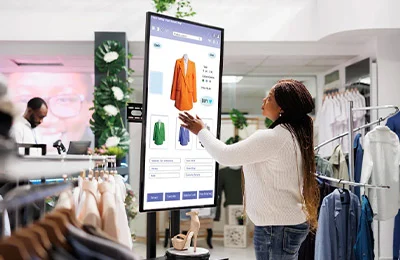
Touch screen kiosks make it easy for customers to explore products through guided flows and smart filters such as size, colour, and price. Rich media like images, videos, and detailed specifications help users understand products better and make informed choices.
Self-Service and Assisted Sales
Kiosks support both independent shopping and staff-assisted experiences. Customers can create orders, view recommendations, and sign up for loyalty programs, while sales staff can use the system to guide them through the buying journey using touch screen retail solutions.
Promotions and Cross Selling
Interactive kiosks can display dynamic promotions, flash offers, and bundled deals based on real-time campaigns. This encourages customers to explore more products and increases opportunities for cross-selling and higher cart value.
Connected Retail Experience
Retail kiosks connect in-store and digital channels to create a seamless shopping journey. Features like store pickup, click and collect, and integration with mobile apps or e-commerce platforms ensure customers enjoy a consistent experience across every touchpoint.
Placement Strategy Inside Stores
Strategic placement of touch screen kiosks plays a key role in maximizing visibility, engagement, and overall effectiveness within retail spaces.
- Entry and High Traffic Zones: Position kiosks at store entrances to capture immediate attention and guide customers toward key categories, offers, or store layouts. This helps create a strong first impression and encourages interaction from the start.
- Product Zones and Aisles: Place kiosks near specific product sections such as electronics, fashion, or home collections. This allows customers to explore detailed information, compare options, and discover related products while they are already browsing.
- Checkout and Self Checkout Areas: Install kiosks near billing counters to promote upselling, loyalty program sign ups, and quick feedback collection. This ensures continued engagement even at the final stage of the shopping journey.
- Personalized Experience Zones: Use kiosks in dedicated areas for tailored interactions such as size finders, product configurators, or style advisors. These experiences help customers make more confident and personalized purchase decisions.
Looking for LED Screen Support?
Let’s have a quick discussion with ADORN LED Screen experts.
Mistakes That Reduce Engagement
Even well-designed kiosks can fail to deliver results if common mistakes are overlooked during planning and implementation.
- Slow or Unresponsive Kiosks: Slow systems frustrate users and quickly discourage them from interacting further.
- Overly Complex UI or Poor Content Design: Cluttered screens and confusing navigation make it difficult for users to complete actions easily.
- Inadequate Placement and Visibility: Kiosks placed in low-visibility areas or poor lighting often go unnoticed by customers.
- Ignoring Maintenance and Updates: Outdated information and technical issues can reduce trust and overall user experience.
Why Experience Design Matters as Much as Hardware
A good kiosk is not just about advanced touch screen retail solutions, but about creating a complete and seamless user experience. Clear user journeys, simple navigation, engaging visuals, and helpful prompts all play an important role in guiding customers and making interactions smooth and enjoyable.
In successful retail environments, especially in the UAE, businesses combine reliable hardware with intuitive design to improve both discovery and sales. Proper staff training also ensures that teams can encourage and support kiosk usage, helping customers get the most value from interactive display systems for retail.
Conclusion
A good retail touch screen kiosk combines fast performance, durable hardware, and a user-friendly design to support smooth product selection and in-store journeys.
Retail touch screen kiosk UAE deployments can enhance customer experience, reduce friction, and improve conversions when planned well. For best results, work with Adorn LED Screens who deliver complete interactive display systems for retail, not just screen installation.