Technology is changing how businesses work and interact with people. Today, many companies are replacing traditional screens and printed materials with interactive touch screen displays. You can see them in offices, retail stores, malls, and even small showrooms.
These displays are not just for showing content; they allow users to touch, interact, explore, and engage. Whether it’s a team meeting in an office or a customer browsing products in a store, interactive screens make the experience faster and more engaging. If you are planning to invest in one, it is important to choose the right type based on your business needs.
Why Businesses Are Switching to Interactive Displays
Interactive touch screen displays are quickly becoming a preferred choice for both offices and retail stores. They offer a smarter and more efficient way to communicate, present, and engage with people. Here’s why more businesses are making the switch:
- Enhanced Collaboration in Workspaces: Interactive displays enable real-time annotations and smooth idea sharing, helping teams communicate and collaborate more effectively.
- Improved Customer Engagement in Retail: They allow customers to explore products through self-service and personalised interactions, enhancing the overall shopping experience.
- Professional Digital Presentations: These displays deliver high-quality visuals and integrate easily with devices, making business presentations more impactful and seamless.
- Cost & Efficiency Benefits: Interactive displays reduce printing costs and serve multiple purposes, making them a smart and efficient investment for businesses.
Interactive Display Needs for Corporate Offices
Meeting Room Collaboration
Interactive displays enable digital whiteboarding and multi-user touch, making meetings more interactive and productive. Team members can share ideas visually in real time, which helps everyone understand concepts clearly. This leads to faster decision-making and more effective discussions.
Video Conferencing & Remote Work
These displays easily integrate with tools like Zoom and Microsoft Teams, allowing smooth screen sharing and wireless casting. Employees can connect with remote teams without technical issues, making communication seamless. This ensures virtual meetings feel more professional and efficient.
Training & Presentations
Interactive displays are ideal for workshops and employee training sessions, offering better engagement than traditional projectors. Trainers can use visuals, annotations, and live demonstrations to explain concepts clearly. This helps employees stay focused and improves overall learning outcomes.
Interactive Displays for Retail Stores
Digital Product Catalogues
Interactive displays allow customers to browse products on their own, making shopping more convenient and faster. They can view details, compare items, and check availability without waiting for assistance. Real-time updates also ensure that the information shown is always accurate.
In-Store Customer Engagement
These displays help attract customers through interactive promotions, offers, and engaging content. Businesses can even include gamified experiences to make shopping more fun and memorable. This increases customer interest and encourages longer store visits.
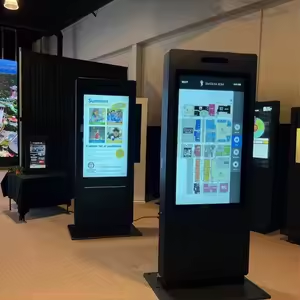
Wayfinding & Information Kiosks
Interactive screens are useful for navigation in malls or large retail spaces, helping customers find stores or specific sections easily. They can also provide store directories and useful information at a touch. This improves the overall shopping experience and saves time.
Branding & Visual Appeal
High-resolution interactive displays give stores a modern and premium look. They enhance the overall ambiance and make the brand appear more professional. This visual appeal can leave a strong impression on customers.
Major Features to Consider Before Buying Interactive Touch Screen Displays
Touch Responsiveness
The display should support multi-touch (at least 10 points or more) to allow multiple users to interact at the same time. It should also provide smooth and lag-free performance for a better user experience, as modern screens are designed for fast and accurate touch detection.
Screen Size & Placement
Choosing the right screen size depends on where and how it will be used. Smaller screens (32–55”) are ideal for kiosks, medium sizes (55–75”) work well in retail, and larger screens (75”+) are best for conference rooms and presentations.
Display Resolution
Resolution affects how clear and sharp the content looks on the screen. While Full HD is the minimum standard, 4K resolution is preferred for better clarity, especially for presentations and product visuals.
Software Compatibility
The display should work smoothly with business applications, POS systems, and different operating systems. Many modern displays support Android, Windows, and other platforms, allowing flexibility and easy integration.
Connectivity Options
A good interactive display must support multiple connectivity options like HDMI, USB, Wi-Fi, and Bluetooth. Wireless screen sharing is also important for easy content sharing without cables.
Build Quality & Durability
Since these displays are used frequently, they should be made with commercial-grade panels and protective glass. Features like anti-glare and scratch-resistant surfaces ensure long-lasting performance even in busy environments.
After-Sales Support
Reliable after-sales support is important for smooth operation over time. Look for warranty, maintenance services, and technical support availability, especially if you are buying in regions like the UAE.
Looking for LED Screen Support?
Let’s have a quick discussion with ADORN LED Screen experts.
How to Choose the Right Display for Your Business
Choosing the right interactive display is important to ensure it meets your business needs and delivers the best value over time. Here are some key points to consider before making a decision:
- Match the display type with your business use to get the right functionality and performance.
- Consider your space, audience, and how frequently the display will be used.
- Compare your budget with the features offered to make a smart investment.
- Choose a reliable supplier in the UAE for proper guidance, installation, and after-sales support.
Conclusion
Interactive touch screen displays have become an important part of modern businesses, helping improve both workplace collaboration and customer engagement. Whether used in offices for meetings and presentations or in retail stores for enhancing the shopping experience, choosing the right display based on your specific use case is key.
Investing in a high-quality, future-ready solution ensures better performance, durability, and long-term value. To make the best choice, it is always a good idea to consult a professional supplier who can recommend the right display tailored to your business needs.